
 留言评论
留言评论
框架添加了留言评论的功能,主版本RSP框架已包含此功能,老版本框架若要使用,请进行如下操作,集成功能:
# 一. 下载源码
# 二. 组件集成
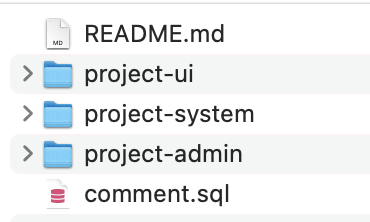
解压下载后的文件,看到如下结构:
# 1. [项目]-system
将[project-system]下的文件复制到您[项目]-system下对应的目录中。
# 2. [项目]-admin
将
[project-admin]/SysCommentController.java复制到您[项目]-admin下com.risun.web.controller.system包下。修改
CommonController.java,添加如下代码:
private static final String THUMBNAIL_PREFIX = "thumbnail_";

...

/**
 * 上传图片同时生成缩略图
 */
@PostMapping("/upload_img_with_thumb")
public AjaxResult uploadImgWithThumb(MultipartFile file) throws Exception {
    try {
        // 上传文件路径
        String profile = RisunConfig.getProfile();
        String filePath = RisunConfig.getUploadPath();
        // 上传并返回新文件名称
        String fileName = FileUploadUtils.upload(filePath, file);
        String url = serverConfig.getUrl() + fileName;
        String source = profile.concat(StringUtils.substringAfter(fileName, Constants.RESOURCE_PREFIX));
        String target = source.replaceAll(FileUtils.getName(fileName), THUMBNAIL_PREFIX.concat(FileUtils.getName(fileName)));
        String thumbnailName = fileName.replaceAll(FileUtils.getName(fileName), THUMBNAIL_PREFIX.concat(FileUtils.getName(fileName)));
        // 生成缩略图
        ImgUtil.scale(new File(source), new File(target), 0.5f);
        AjaxResult ajax = AjaxResult.success();
        ajax.put("url", url);
        ajax.put("fileName", fileName);
        ajax.put("newFileName", FileUtils.getName(fileName));
        ajax.put("originalFilename", file.getOriginalFilename());
        ajax.put("thumbnailName", thumbnailName);
        return ajax;
    } catch (Exception e) {
        return AjaxResult.error(e.getMessage());
    }
}
# 3. [项目]-ui
将
[project]-ui下的文件复制到您[项目]-ui对应的目录下- 将
like.svg复制到src/assets/icons/svg下 - 将
comment.js复制到src/api/system下 - 将
play.vue复制到src/components/Video下 - 将
Comment文件夹复制到src/components下
- 将
修改
[项目]-ui下main.js
// 删除
import VideoPlayer from '@/components/Video'

// 添加
import VideoMonitor from '@/components/Video'
import VideoPlayer from '@/components/Video/play'

Vue.component('VideoMonitor', VideoMonitor)
# 4. 数据库添加留言评论表
在您的项目中,执行 comment.sql
# 三. 使用说明
# 1. 属性
props: {
  // 业务模块
  bizModel: {
    type: String,
    required: true
  },
  // 业务主键
  bizId: {
    type: Number,
    required: true
  },
  // 评论是否可上传图片
  showImg: {
    type: Boolean,
    required: false,
    default: false
  },
  imgFileSize: {
    type: Number,
    required: false,
    default: 1  // 图片大小,默认1Mb
  },
  // 评论是否可上传视频
  showVideo: {
    type: Boolean,
    required: false,
    default: false
  },
  videoFileSize: {
    type: Number,
    required: false,
    default: 8  // 视频大小,默认8Mb
  }
}
# 2. 使用
<comment :bizModel="'demo'" :bizId="100" />

<comment :bizModel="'demo'" :bizId="100" :showImg="true"/>

<comment :bizModel="'demo'" :bizId="100" :showImg="true" :showVideo="true"/>